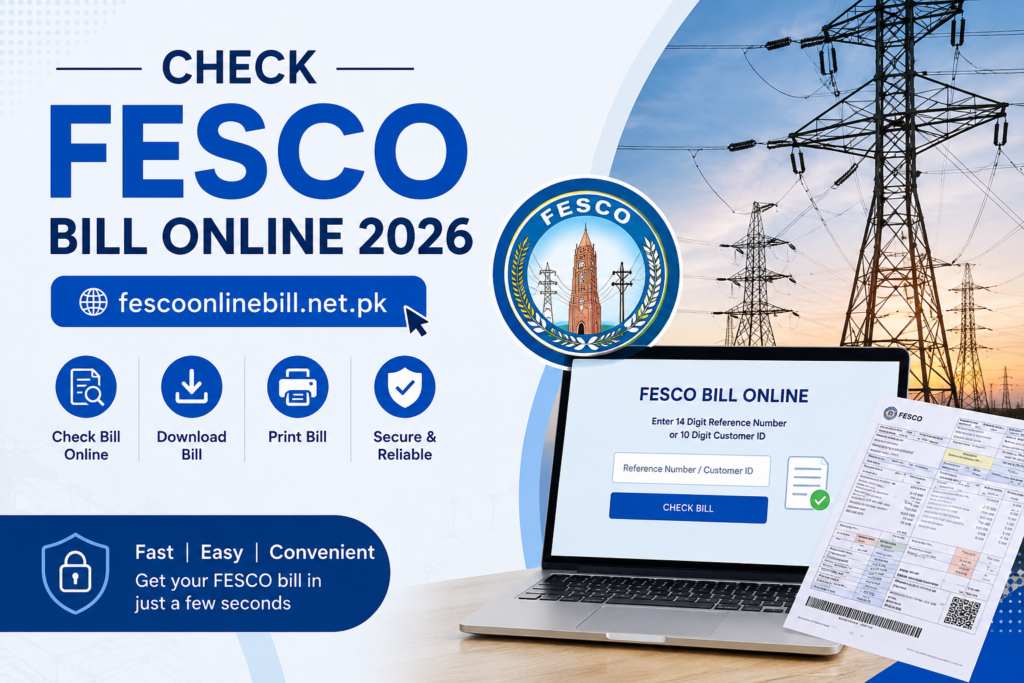
Haven’t received your electricity bill yet or facing issues while getting your FESCO bill? Now you can easily check your FESCO Bill Online without any hassle and download or print it anytime for payment or record purposes
No need to worry fescoonlinebill.net.pk provides a quick and simple way to check your FESCO Online Bill using either your 14-digit Reference Number or 10-digit Customer ID Just enter your details above and get your latest bill within seconds
In addition this guide will help you understand FESCO services, coverage areas, peak hours, payment methods, and much more
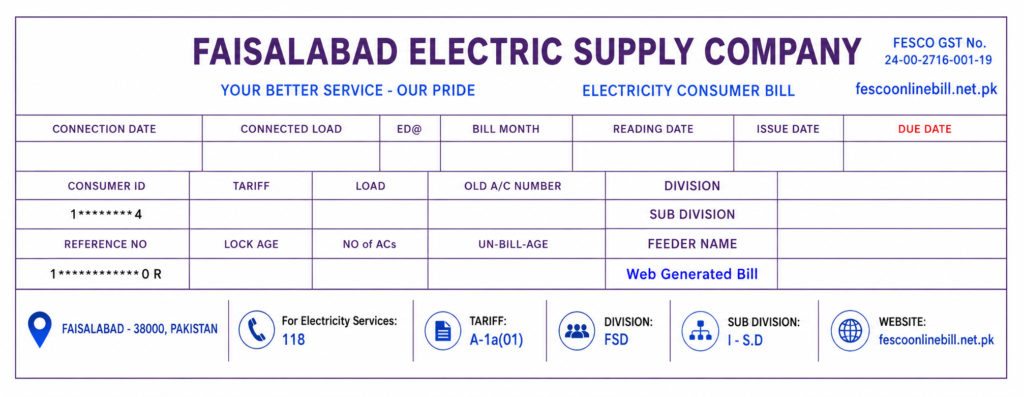
How to Find a 14-Digit Reference Number?
You cannot check your FESCO Bill Online without a 14-digit Reference Number. You can easily find this number on the top left corner of your electricity bill or duplicate copy under the “Reference No” section.
If you are having trouble locating it, simply check the blue highlighted box shown in the image below. Once you find the reference number, enter it in the bill checker above to instantly view, download, or print your latest FESCO bill
- How to Find a 14 Digit Reference Number?
- About FESCO
- FESCO Services
- Bill Information
-
FESCO Consumers area
- Districts and their Cities
-
Key features of FESCO Online Bill
- Easy Access to FESCO e Bill
- Mobile Friendly Interface
- Historical Bill Data
- Download FESCO Duplicate Bills
- Multiple Bill Payment Options
- Bill Alerts and Notifications
- Comprehensive Bill Details
- How to Check and Download FESCO Bill Online
- How to Print FESCO Bill Online
- How to Print Tax Certificate
- TOU/TOD meter
- How to Check FESCO Bill Paid or Not?
- How to fix the FESCO Bill Not Found Error?
- FESCO Peak Hours and Load Management
- How to apply for SMS Service
- FESCO Bill Email Service
- Aim of FESCO
-
Payment Methods
-
Online Payment:
- How to Pay Using Apps:
- MCB Live
- EasyPaisa
- JazzCash
- Offline Payment:
-
Online Payment:
- Customer Service Centers
- FESCO MIS
- FESCO Bill Correction
- Common Issues and Solutions
-
Taxes and Charges Explained
- FPA
- Fixed Charges
- Energy Charges
- Taxes
- Electricity Duty
- Head Office Address
- FESCO Customer Support and Helpline
About FESCO
FESCO is the Faisalabad Electric Supply Company. This company was started in 1998. The main goal of FESCO is to provide electricity to people in areas of Punjab, Pakistan. FESCO gives electricity to around 4.96 million customers. It also serves a lot of people. Over 26 million.
FESCO works under an organization called WAPDA, which is the Water and Power Development Authority. FESCO is in charge of giving electricity to 8 districts of Punjab. The company has to follow rules made by NEPRA, which’s the National Electric Power Regulatory Authority. NEPRA keeps an eye on the power sector in Pakistan.
FESCO wants to make things easy for its customers. So it has services. These services let people check their electricity bills on the internet. They can also. Print their bills from anywhere they want. This is very convenient, for FESCO customers
| Details | Information |
|---|---|
| Company Name | FESCO (Faisalabad Electric Supply Company) |
| Established | 1998 |
| Category | Electricity Distribution Company |
| Industry | Power & Electricity Distribution |
| Office Location | Faisalabad |
| Head Office | Faisalabad, Pakistan |
| Owner | Government of Pakistan |
| Total Employees | 14,000+ |
| CEO | Engineer Muhammad Amir |
| Areas Covered | Central Punjab |
FESCO Services
FESCO is here to help its customers with electricity. They do a lot of things to make life easier for people who use their service. Some of the things FESCO does for its customers include:
- Fixing mistakes on electricity bills. Making sure they are up to date
- Putting in meters replacing old ones and reading meters
- Making bills taking payments and managing bills
- Helping customers when they have problems and dealing with complaints
- Getting electricity to people and without any issues
- Letting people check their electricity bills online download them. Pay them online
All these things that FESCO does help people who use their service to take care of their electricity and bills in a better way. FESCO services are really helpful, for FESCO customers.
Bill Information
You can check your FESCO electricity bill on fescoonlinebill.net.pk. This website lets you see your FESCO electricity bill. You can find out how much you have to pay and when you have to pay it.
The website tells you lots of things, about your FESCO electricity bill. You can see when your meter was read and when your bill was sent to you. You can also see how electricity you used and what you paid for the last 12 months.
You can get a copy of your FESCO electricity bill from the website anytime you want. You can download it. Print it out to pay your bill or to keep a record of your FESCO electricity bill payments.
FESCO Consumers
A lot of FESCO consumers are from Faisalabad, which’s one of the biggest cities for industry in Punjab. FESCO provides electricity to people in cities. Also to many small towns and villages in Central Punjab.
FESCO gives electricity to millions of people who use it at home and to businesses, farms and factories in the areas where FESCO operates. FESCO electricity reaches around 30 areas that vote for the National Assembly and 50 areas that vote for the Punjab Assembly, which makes FESCO a big company for distributing electricity in Pakistan.
FESCO makes sure that people get electricity when they need it in all the areas where FESCO is supposed to provide electricity. FESCO is, in charge of getting electricity to all FESCO consumers and FESCO does this in all the areas where FESCO is allowed to work.
FESCO Coverage Areas
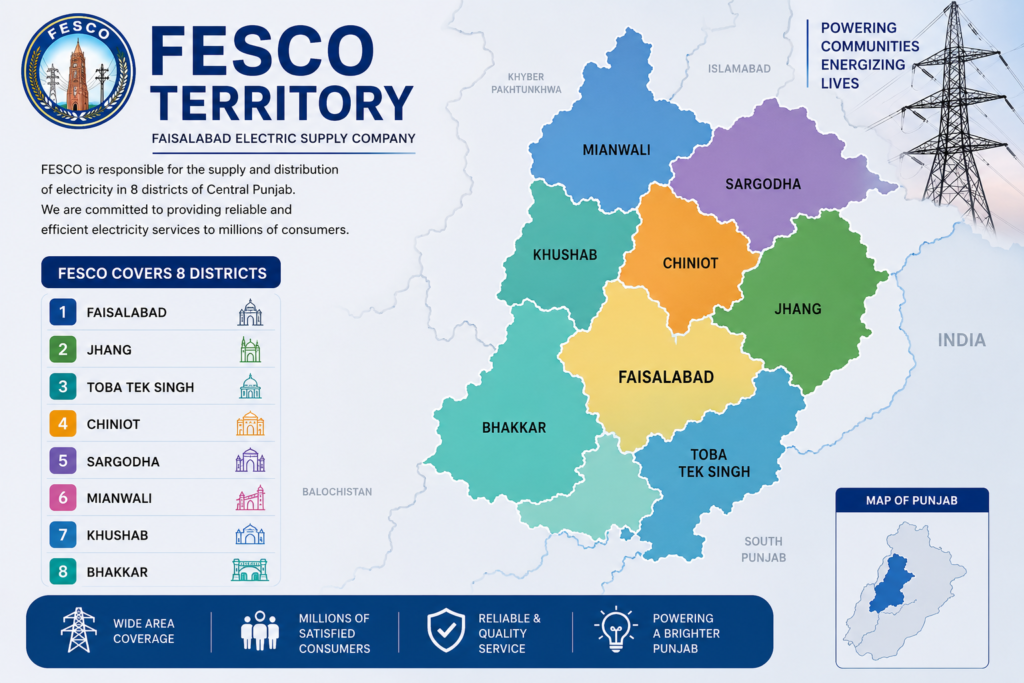
FESCO provides electricity services across 8 major districts of Punjab, with Faisalabad being the primary and largest coverage area. The company is responsible for the supply and distribution of electricity in both urban and rural regions within these districts.
The following districts are included in FESCO’s coverage areas
Districts and Their Cities
FESCO provides electricity services across 8 districts, supplying power to multiple cities within each district. Below is the list of these districts along with the cities served by FESCO
| District | Cities Served by FESCO |
|---|---|
| Faisalabad District | Faisalabad City, Jaranwala Chak, Jhumra Saddar, Tandlianwala, Sammundari |
| Sargodha District | Sargodha City, Sillanwali, Sahiwal, Bhera, Shahpur, Bhalwal, Kot Momin |
| Jhang District | Jhang City, Ahmad Pur Sial, 18-Hazari, Shorkot |
| Toba Tek Singh District | Toba Tek Singh City, Pir Mahal, Kamalia, Gojra |
| Bhakkar District | Bhakkar City, Darya Khan, Mankera, Kallur Kot |
| Khushab District | Khushab City, Noorpur Thal, Naushera, Quaidabad |
| Mianwali District | Mianwali City, Isa Khel, Piplan |
| Chiniot District | Chiniot City, Lalian, Bhowana |
Key Features of FESCO Online Bill
The FESCO Online Bill is really helpful because it lets users check the FESCO Online Bill download the FESCO Online Bill and print the FESCO Online Bill at any time they want. Here are some of the things that the FESCO Online Bill can do for users of the FESCO Online Bill.
Easy Access to FESCO e-Bill
You can use FESCO e-Bill to look at your electricity bill on the internet. This is an easy thing to do. You can check your FESCO e-Bill at any time and, from any place.
To see your bill you just need to go to the website and type in your 14-digit Reference Number or your 10-digit Customer ID.
Then you can look at your FESCO e-Bill away or you can download it or print it out.
This way you can get to your FESCO e-Bill quickly and easily from your home.
Mobile-Friendly Interface
The FESCO Online Bill website is made to work on mobile phones. This means that people can use it easily. The FESCO Online Bill website has a box at the top where customers can put in their Reference Number or Customer ID. The Reference Number is fourteen digits and the Customer ID is ten digits. When customers click the Check Bill button they can see their bill details, on their phone screen right away. This makes checking the FESCO Online Bill easy and fast for all FESCO Online Bill customers.
Historical Bill Data
The FESCO Online Bill lets people see their electricity bills for the last 12 months. They can also check if they have paid each bill or not. People can look at their bills in the special bill history part of the website. If you want to know how to do this you can read the article on this website that tells you what to do one step at a time. The FESCO Online Bill is really helpful, for looking at your electricity bill history.
Download FESCO Duplicate Bills
You can easily. Print a duplicate electricity bill from FESCO Online Bill.
If you lost your bill you can get a duplicate copy online.
To do this open your FESCO bill click the “Print Bill” button at the top and select “Save, as PDF” to download it instantly.
Download FESCO Duplicate Bills
You can get a copy of your FESCO bill online. This is really helpful if you lose your FESCO bill. You can get a FESCO bill anytime you need it.
To get your FESCO bill you just need to open it and click the button that says “Print Bill”. Then you need to select the option that says “Save as PDF”. This way you can save your FESCO bill to your computer. You can do all of this easily and it will not take much time to get your FESCO bill.
Bill Alerts and Notifications
FESCO sends SMS and email alerts to help customers know about their electricity bills and payments.
You can get bill reminders on your phone or email by subscribing to these alerts.
To get these services just follow the guides in the articles on this website.
Comprehensive Bill Details
This website has all the information, about your FESCO electricity bill.
You can see a breakdown of taxes, surcharges, GST and other charges.
FESCO bills can be checked online using your 14-digit Reference Number or 10-digit Customer ID.
You can easily check your FESCO bill on the website.
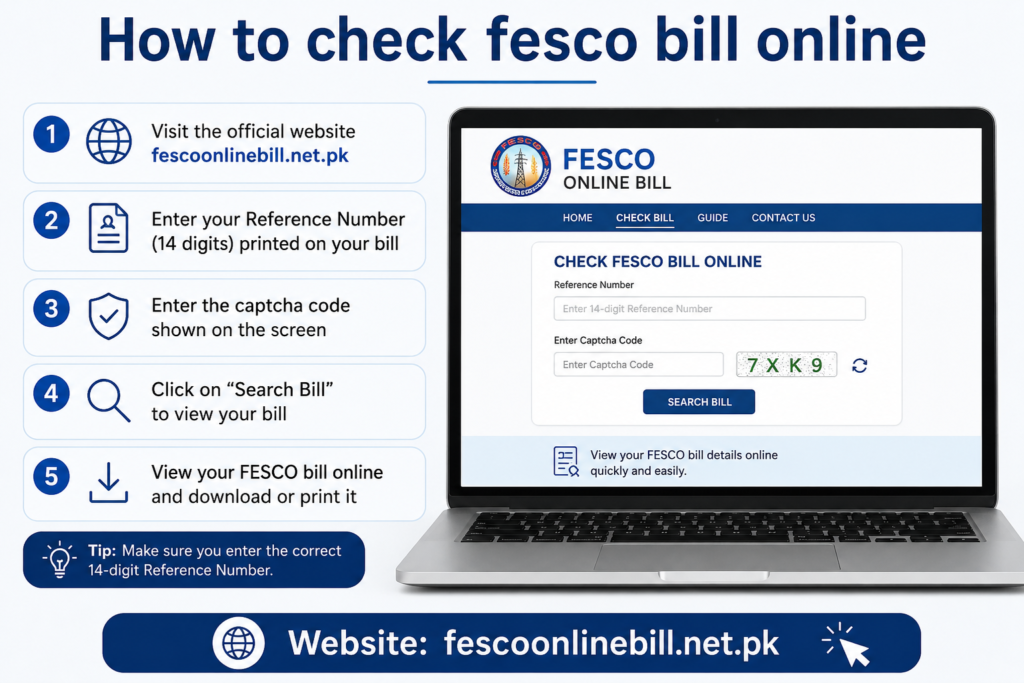
How to Check and Download FESCO Bill Online
You can. Download your FESCO bill online. This is a process.
To do this you need to follow some steps.
- First you need to go to the FESCO website where you can check your bill online.
- Then you need to enter your Reference Number. This number has 14 digits. You can also use your Customer ID. This ID has 10 digits.
- After that you need to click the “Check Bill” button. This button will show you your FESCO bill
- When you see your FESCO bill you need to click the “Print Bill” button. This button is, at the top of the page.
- Now you need to change the print settings. You need to save your FESCO bill as a PDF file. So you need to select “Save as PDF.”
- Then you need to click the “Save” button. This button is blue.
- Your FESCO bill will start downloading to your device. This will happen automatically.
- FESCO also has an SMS service. You can get your FESCO bill on your phone through this service.
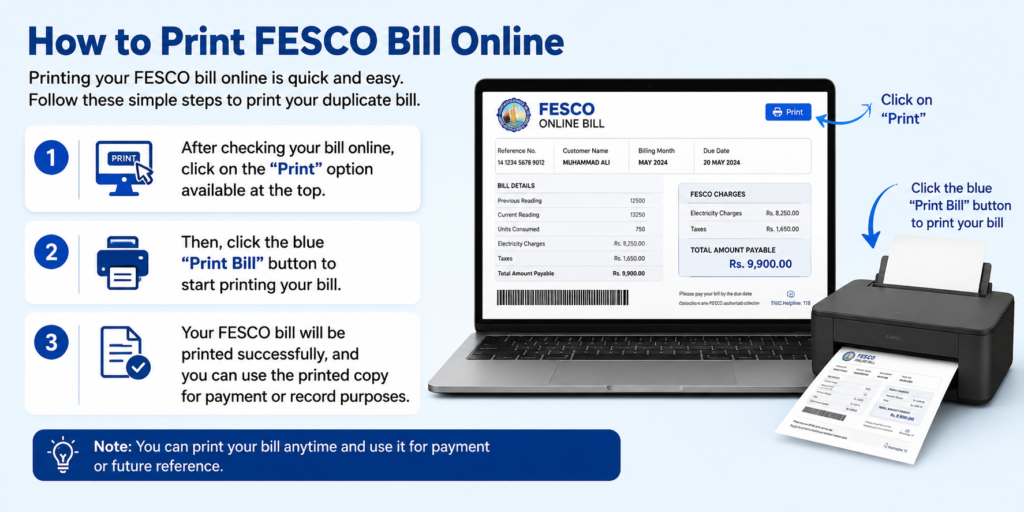
Printing your FESCO bill online is really simple. You can get a copy of your bill by doing a things.
To print your FESCO bill follow these steps:
- Look at your FESCO bill online. Then click on the “Print” option, at the top of the page.
- Next you need to click the blue “Print Bill” button to start printing your FESCO bill.
- Your FESCO bill will be. You can use this FESCO bill to pay or keep a record.
Getting your FESCO Tax Certificate is easy. You can. Print it without any hassle. Here is what you need to do:
Step 1: First you need to look at your FESCO bill. To do this you have to enter your Reference Number in the box at the top.
Step 2: When you see your bill details click on the “Tax Certificate” option. This option is next, to the “Bill” option. If you cannot find it look at the picture to help you out.
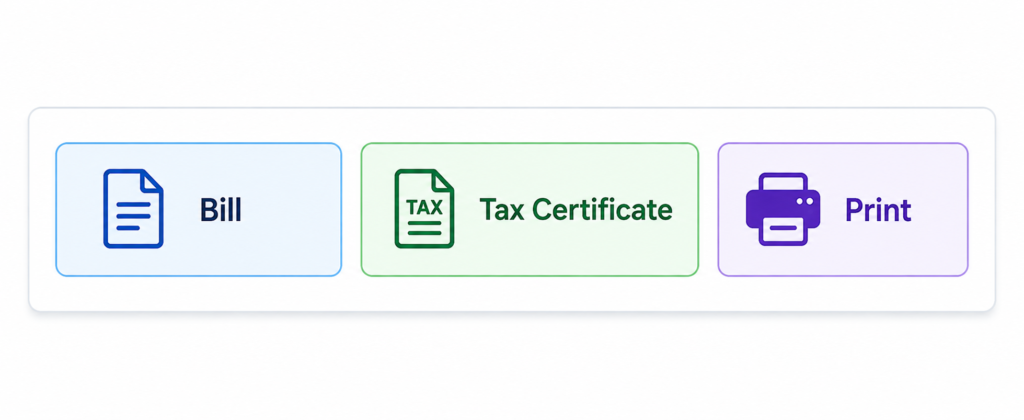
Step 3: Click on the “Print” button to open the print option. Then, click the “Print” button located at the bottom-right corner of the page to print your Tax Certificate successfully.
TOU/TOD Meter
TOU/TOD meters are electricity meters. They help people use electricity in a way. These meters split the day into times like peak hours and off-peak hours. The electricity rates are different during these times.
Using electricity during off-peak hours can save you money. It also helps use energy efficiently.
How to Check if Your FESCO Bill is Paid or Not
If you paid your electricity bill you can check if the payment went through. You can easily see if your FESCO bill is paid or not. Just follow the steps, in the “Bill Paid or Not” guide. This will help you verify your payment status quickly.
How to Fix the FESCO Bill Not Found Error
If you get the FESCO Bill Not Found error when you try to check your FESCO bill do not worry. You can fix this problem by following these steps:
- Check Your Reference Number:
Before you click the Check Bill button make sure you put your 14 digit FESCO Reference Number in the box correctly.
- Verify Your Consumer ID:
If you are checking your FESCO bill using your FESCO Consumer ID make sure you put the 10 digit FESCO Consumer ID in the box without making any mistakes.
Checking your FESCO bill details again can help you fix the FESCO Bill Not Found error and get your FESCO bill easily.
FESCO Peak Hours and Load Management
FESCO does things to manage the amount of electricity people use. This helps make sure everyone gets a supply of power. They do this in all 8 areas where FESCO operates.
FESCO has times when they say it is peak hours. These are the times:
- April to October: 6:30 PM to 10:30 PM
- November to March: 6:00 PM, to 10:00 PM
When it is FESCO peak hours a lot of people are using electricity at the time. So FESCO peak hours are when we should try to use power. This helps FESCO make sure the power supply is good all day long. FESCO peak hours are important because they help FESCO give us an electricity supply.
How to Apply for FESCO SMS Service
FESCO has an useful FESCO SMS Service that sends your electricity bills right to your mobile phone. The FESCO SMS Service is great for people who want to see their bill soon, as possible without having to wait for a paper bill or look it up online.
To sign up for the FESCO SMS Service you can do what the FESCO SMS Service guide says. The guide will tell you everything you need to know about the FESCO SMS Service.
FESCO Bill Email Service
If you do not want to check your bill on the internet or get it by text message FESCO has an email service. This service sends your electricity bill to your email address. You can look at it on your phone or computer whenever you want.
To start using this service you can do what it says in the FESCO Bill Not Received guide.
Aim of FESCO
The main goal of FESCO is to give people in Faisalabad and other areas reliable and safe electricity. FESCO wants to make sure that people get electricity all the time. This helps people have a life and supports businesses in the area where FESCO provides electricity. FESCO is about providing affordable, reliable and safe electricity to its consumers.
Payment Methods
You can pay your FESCO bill in easy ways both on the internet and, in person. There are simple ways to pay your bill online. Here are some ways:
Online Payment Methods:
You can pay your FESCO bill easily using these services without paying any money:
- Mobile Banking Apps
- MCB Live
- JazzCash
- Easypaisa
- Any other app that lets you pay bills online
These ways let you pay your FESCO electricity bill quickly and safely from anywhere. You can use these methods to pay your FESCO bill.
How to Pay Using Apps
MCB Live
If you are an MCB Bank customer you can pay your FESCO electricity bills using the MCB Live Mobile Banking App. You can find the MCB Live Mobile Banking App on the Google Play Store. This way of paying is very safe and easy. You can pay your FESCO electricity bill at any time and from any place. You do not have to leave your home to pay your FESCO electricity bill.
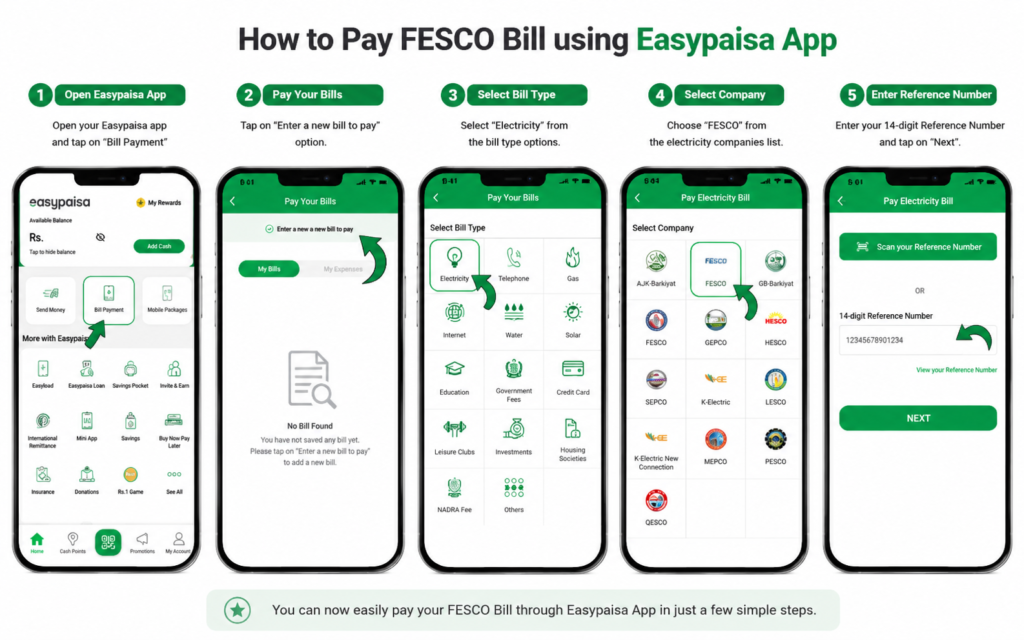
EasyPaisa
You can also use EasyPaisa to pay your FESCO electricity bills. EasyPaisa is available, on Android and iOS devices. To pay your FESCO bill using EasyPaisa you need to enter your 14-digit Reference Number.
To pay using EasyPaisa you should follow the steps that are given to you. This will help you pay your FESCO electricity bill quickly and easily. You can pay your FESCO electricity bill using EasyPaisa whenever you want.
JazzCash
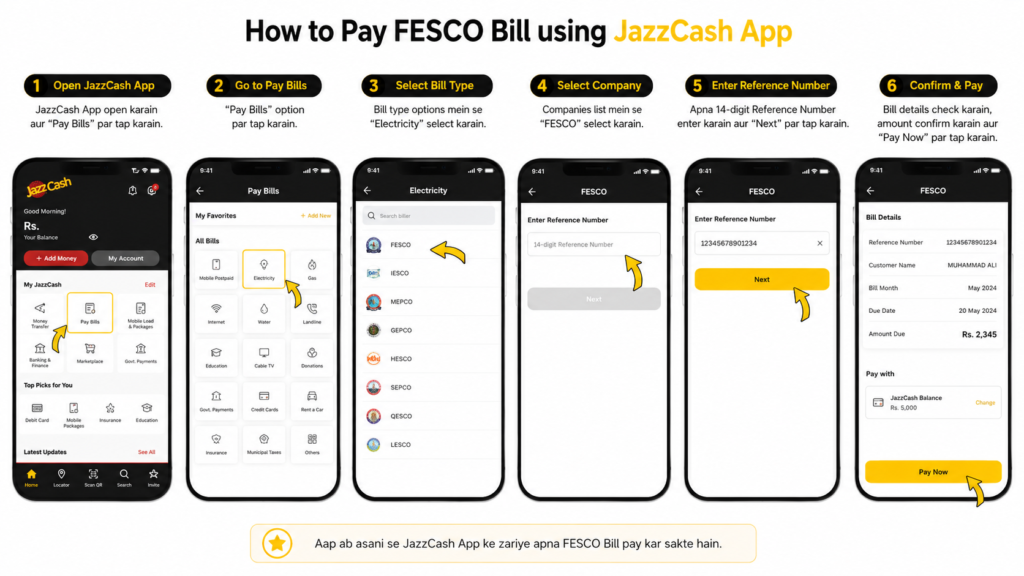
You can pay your FESCO electricity bill easily using the JazzCash mobile app* on your phone. Just download the app on your Android or iOS smartphone. You are good to go.
To pay your FESCO bill with JazzCash just follow these steps.
First you need to install the JazzCash application.
Then you can make a payment.
Here is how you can do it:
- Step one: Open the JazzCash app, on your phone.
- Step two: Go to the bill payment section.
- Step three: Enter your FESCO bill details.
- Step four: Confirm your payment.
Offline Payment
If you want to pay your FESCO bill without using the internet you will need a paper copy of your electricity bill. You can pay your bill at the places:
- All Commercial Banks
- Microfinance Banks
- Post Offices in your city
These places make it easy for you to pay your FESCO bill. You can just go there. Pay your bill. It is simple. You can trust these places.
Customer Service Centers
FESCO has service centers to help customers. These centers are there to solve your problems quickly. You can go to the center near your home if you have a problem with your FESCO bill. The people who work there can help you with things like:
- If you are not happy with your bill
- If you want to get an electricity connection
- If you have a problem with your meter
- If you just need some help
The good thing about these centers is that you can talk to someone face to face. They can help you solve your problem quickly.
FESCO MIS
FESCO has a system called FESCO MIS. This system helps FESCO manage electricity and services. If you want to know more about FESCO MIS you can read the FESCO MIS guide.
FESCO Bill Correction
If you think your FESCO bill is wrong you can ask FESCO to correct it. Maybe your bill has the amount of money you owe or maybe your name or address is wrong. You can read the FESCO Bill Correction guide to learn how to fix your bill.
Common Issues and Solutions
If you are having trouble with your FESCO bill do not worry. You can read the Issues and Solutions guide to solve your problem. This guide can help you with things like:
- Problems with your bill
- Problems with your meter
- If you did not get your bill on time
- If you have a problem with the FESCO website
Taxes and Charges Explained
Your FESCO bill may have some costs. These costs are:
FPA (Fuel Price Adjustment)
FPA is the cost of fuel that FESCO uses to make electricity. This cost can change if the price of fuel changes.
Fixed Charges
Fixed charges are an amount that FESCO adds to your bill. This amount is the same every month no matter how electricity you use.
Energy Charges
Energy charges are based on how electricity you use. If you use electricity you will pay more.
Taxes
Your FESCO bill may also have some taxes. These taxes are decided by the government. You may see taxes like GST (General Sales Tax), on your bill.
Electricity Duty
Electricity Duty is a tax that the government charges to people who use electricity in Pakistan. This tax is usually 1.5% of your electricity bill. FESCO adds this tax to your bill.

FESCO Head Office Location Map
FESCO Customer Support & Helpline
I have some questions or problems with FESCO. I can call them using the numbers below.
You can get numbers from FESCO, like staff numbers and extra support lines. FESCO has a page with all the helpline information, for complete help.
FESCO Customer Support Contact Details
You can contact FESCO for any complaints, emergencies, or general inquiries using the following official contact details:
- Phone #1: +92 (41) 9220184 – 9220229
- Phone #2: +92 (41) 9220290
- Phone #3: +92 (41) 9220176
- UAN (Universal Access Number): 0800 66554
- Fax: +92 (41) 9220233
- Email: complaint@fesco.com.pk
This website lets you look at your FESCO bill. You can do this by using your 14-digit Reference Number or your 10-digit Customer ID.
We have written down all the details about the FESCO bill process. This includes how you can pay your bill, how to check your FESCO bill, the areas where FESCO works the services they offer and how to get help from them. We also have useful information.
If you still have questions, about your FESCO bill or you need help you can contact us at any time. We are here to help you with your FESCO bill.